Batch EXIF Viewer: Check Multiple Photo Metadata Online
As a digital content creator handling hundreds of photos weekly, do you find yourself frustrated by the limitations of traditional EXIF viewers that only process one image at a time? Perhaps you have a folder full of vacation photos and want to verify which ones contain sensitive GPS location data before sharing them. Or maybe you are a professional photographer trying to compare ISO and aperture settings across a series of shots to see which configuration worked best.
How can you efficiently manage multiple images without wasting hours?
The need to analyze multiple photos for GPS locations, camera settings, or copyright information can become a time-consuming bottleneck. While many software packages offer bulk processing, they often require expensive subscriptions or risky installations. This comprehensive guide reveals practical workarounds and optimized workflows for bulk EXIF analysis using browser-based tools. You will learn how to process your image metadata efficiently using a metadata reader without ever compromising your privacy or security.

Limitations of Traditional EXIF Viewers
When you start looking for a batch EXIF viewer, you quickly realize the market is divided. On one side, you have heavy desktop software. On the other, you have lightweight web tools. Most free web tools are designed for single-file analysis. While this is great for a quick check, it creates a "speed limit" for users who have dozens or hundreds of files to inspect.
Understanding the Single-File Processing Constraint
The primary reason most web-based tools focus on one file at a time is due to how browsers handle file memory. Historically, web applications were not designed to hold massive amounts of image data simultaneously. When you view exif data, the tool must parse the file header, extract the metadata tags, and render them in a readable format.
For many developers, building a tool that handles one file is simple and stable. However, for a power user, this means clicking "Upload," waiting, reading, and then repeating the process fifty times. This "one-by-one" approach is the biggest hurdle for social media managers and photographers who need to verify data across entire albums.
Privacy Concerns with Cloud-Based Batch Tools
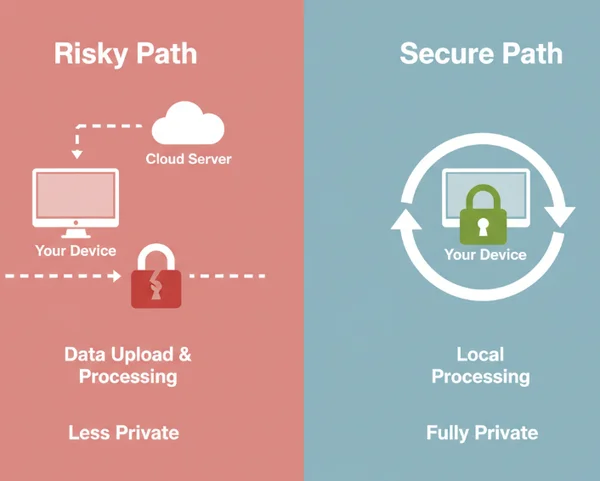
If you search for "bulk EXIF tools," you will find several websites that claim to process hundreds of photos at once. However, there is a catch. Most of these tools require you to upload your images to their cloud servers. This is where the privacy risk becomes significant.
Uploading images to third-party servers means losing control of your data. Servers could store photos indefinitely, use them for AI training, or log GPS coordinates—all hidden risks. The best way to handle metadata is through client-side processing, where the file never leaves your computer. Using a secure tool ensures that your "batch" workflow doesn't turn into a "data leak" workflow.
Optimized Workflow for Batch EXIF Analysis
Even if a tool is technically designed for one-at-a-time use, you can optimize your behavior to achieve "pseudo-batch" speeds. The key is to reduce the friction between "selecting a file" and "viewing the data." By refining your manual process, you can often work faster than it takes to install and configure complex software.
Sequential Processing Techniques with Browser Tools
The most efficient way to use a browser-based online viewer is to master the "Drag, Drop, and Refresh" cycle. Modern browsers read local files instantly using JavaScript—no lag, no uploads. Since the processing happens on your own CPU, there is no "upload time."
To optimize your workflow, follow these steps:
- Open your file explorer and the browser side-by-side.
- Select your first image and drag it into the viewer.
- Quickly scan the necessary fields like GPS or Camera Model.
- Drag the next image immediately.
Because the tool does not need to send data to a server, the results appear instantly. This sequential method is often faster than bulk uploading to a slow website that has to process images on its own server.
Organizing Photo Groups for Efficient Metadata Collection
To make bulk exif analysis truly effective, you must organize your files before you start the checking process. Instead of looking at a random pile of 200 photos, categorize them into smaller "priority folders."
For example, create a folder named "To Check for GPS" and another named "Copyright Verification." Group images by purpose (e.g., ‘GPS Check’). This tells your eyes exactly where to scan on-screen for each file’s critical data. This mental focus allows you to fly through a list of images much faster than if you were looking for different types of data each time. You can use an online tool to verify each group systematically.
Advanced Workflows for Faster Metadata Analysis
If the manual drag-and-drop method is still too slow for your needs, you can leverage advanced browser features. These tricks allow you to bypass the single-file limitation and create a high-speed environment for metadata inspection.
Tab Management for Parallel Processing
One of the simplest yet most effective workarounds is "Parallel Processing" using browser tabs. Most modern computers have enough RAM to handle multiple instances of a webpage.
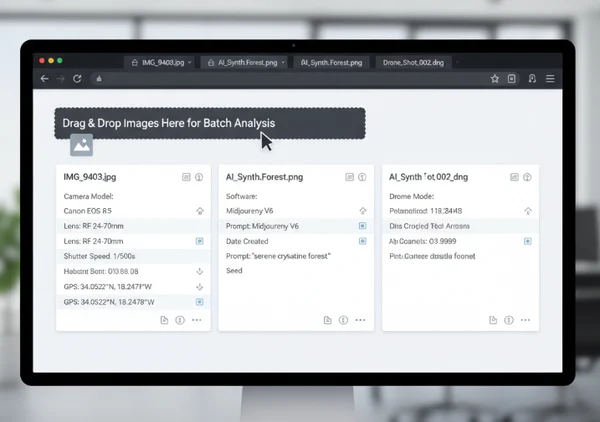
Instead of using just one window, open five or ten tabs of ExifReader. You can then drag one image into each tab. This allows you to keep the data for ten different photos open at the same time. You can switch between the tabs using shortcuts like Ctrl+Tab to compare settings like ISO or shutter speed side-by-side. This is a game-changer for photographers who need to see how their settings changed throughout a specific photo shoot.
Bookmarklet Integration for One-Click EXIF Checks
For technical users, creating a workflow that starts with a single click is the ultimate goal. While many people use the main homepage, you can bookmark the tool in your browser’s favorites bar for instant access.
Whenever you come across a photo online or need to check a local file, having that shortcut ready saves seconds of navigation time. If you combine this with the tab management strategy, you create a dedicated workspace for metadata analysis. This setup mimics the functionality of expensive professional software but remains completely free and privacy-focused.
Industry-Specific Applications for Bulk EXIF Analysis
Different professionals have different reasons for checking metadata. Understanding these use cases can help you tailor your workflow to your specific job requirements.
Social Media Content Verification Workflow
Social media managers often handle user-generated content (UGC). Before posting a photo from a fan or a customer, it is vital to check photos for privacy risks. If a customer sends a photo taken inside their home, the EXIF data might contain their exact home address via GPS coordinates.
A smart workflow for social media managers involves an initial batch screen. Drag all planned posts into the viewer to check the GPS section. Following this, verify the Artist or Copyright tags in the IPTC data to ensure proper credit is given. Finally, ensure the image resolution and color profile are suitable for platforms like Instagram or LinkedIn.
Real Estate Photography Metadata Management
In real estate, consistency is key. A gallery for a house listing should look uniform. If one photo is bright and clear while another is dark and grainy, it looks unprofessional. Real estate photographers use image metadata analysis techniques to compare the lighting settings of different rooms.
By checking the metadata of a "perfect" shot of the living room, the photographer can ensure they used similar aperture and white balance settings for the kitchen. This ensures the entire virtual tour feels cohesive. Using a fast browser tool allows them to verify these technical details quickly before sending the final files to the real estate agent.
Optimized Metadata Strategies
Batch EXIF analysis is often slower than it should be—but with the right approach, you can protect privacy and save time. Think of your workflow like a photographer’s toolkit: organize files first, leverage browser tabs, and focus only on the metadata that matters. By using these local processing methods, you eliminate the need to trust external servers with your location data or personal image library.
Secure metadata management is about taking control of your digital footprint, one file at a time. This approach ensures your technical checks are as rigorous as your creative work. Whether you are managing a small personal album or a massive commercial database, these browser-based habits provide the speed you need without the security trade-offs of traditional cloud tools.
The Takeaway
Is there truly a way to check EXIF data for multiple photos at once with browser-based tools?
Yes, although most tools process files one-by-one, you can achieve a batch-like effect by using "Parallel Processing." By opening multiple tabs of a metadata viewer, you can load and view the data for several images simultaneously. Additionally, because client-side tools process files instantly without uploading, the sequential drag-and-drop method is much faster than traditional upload-and-wait bulk tools.
How does batch EXIF analysis affect photo privacy compared to uploading images?
Privacy is the biggest difference. Traditional bulk websites require you to upload your entire library to their servers. This exposes your private locations and personal habits to the site owner. In contrast, using a client-side tool means the metadata is read directly by your browser. Your images never leave your computer, making it the safest way to handle sensitive batch data.
What's the most efficient workflow for checking GPS metadata on hundreds of travel photos?
The most efficient workflow is to sort your photos by Location or Date in your computer's file explorer first. Once grouped, use the sequential drag-and-drop method in your browser. Focus your eyes on the GPS and Map sections of the results. Since there is no upload delay, you can verify dozens of photos per minute, identifying which ones need to have their location data stripped before being shared online.