EXIF Data on Instagram: Protect Privacy When Sharing Geotagged Photos
As a travel content creator, you know the feeling. You’ve just captured the perfect photo: a secluded waterfall, a hidden alleyway cafe, or a breathtaking sunrise from a secret viewpoint. Your first instinct is to share it on Instagram, but then a thought stops you. Do you really want to share the exact GPS coordinates of this special place with the world?
This is the modern travel blogger's dilemma. We want to share our incredible discoveries, but we also need to protect our privacy and preserve the very locations we love. The key to navigating this challenge lies in understanding the hidden information embedded in your photos, known as EXIF data. This data, especially the geotag, can reveal far more than you intend.
This guide will show you how to take control of your photo metadata. We’ll explore what happens to your EXIF data on Instagram and provide a simple, secure checklist to protect your privacy before you post. You can start by checking your images instantly and safely with a free online EXIF reader that never uploads your files.
Understanding Geotagging & EXIF Data on Instagram
Before you can protect your data, you need to know what you’re dealing with. Every digital photo is more than just pixels; it’s a container for a wealth of information. This is where EXIF data and geotagging come into play, and their relationship with Instagram is often misunderstood.
What is Geotagging and Why It Matters for Travel Bloggers
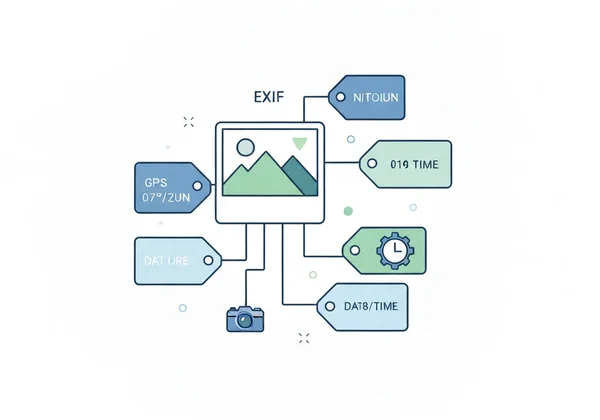
Geotagging is the process of adding geographical identification to a photograph. When your phone or camera's location services are on, it automatically records the precise latitude and longitude where a photo was taken. This information is stored within the image's EXIF (Exchangeable Image File Format) data, alongside other details like:
- Camera model and lens
- Aperture, shutter speed, and ISO settings
- Date and time of capture
For travel bloggers, this data is a double-edged sword. On one hand, it helps you organize your photos and remember where you’ve been. On the other, sharing a photo with its geotag intact is like pinning your exact location on a public map. This can lead to privacy risks, personal security concerns, and even contribute to over-tourism at sensitive natural sites.
Does Instagram Remove EXIF Data? Separating Fact from Fiction
This is one of the most common questions, and the answer is nuanced. Yes, Instagram strips most of the original EXIF data from photos when you upload them to its platform. This includes camera settings, lens information, and other technical details.
However, this is not a complete privacy solution. Instagram does read the GPS data during the upload process. It uses this information to suggest a location for you to tag in your post. While the public can't download your image and see the original GPS coordinates in the file, Instagram has still processed that location information.
Instagram isn’t enough to protect your privacy. To stay safe, you must check your photos before sharing.
Your Pre-Upload Checklist: Protecting GPS Data in Travel Photos
Gaining control over your photo’s metadata is easy. By building a simple pre-upload routine, you can share your amazing travel content with confidence, knowing your sensitive location data is secure. Here is your three-step checklist for safe sharing.
How to Check EXIF Data Before Uploading to Instagram (Using ExifReader.org)
The first and most important step is to see what information your photo actually contains. You might be surprised by how much detail is hidden inside. The safest way to do this is with a tool that works directly in your browser without uploading your image to a server.
Here’s how to do it in seconds with ExifReader.org:
- Open the Tool: Navigate to the ExifReader.org website in your browser.
- Drag and Drop: Simply drag your photo file from your computer and drop it into the designated area on the page. You can also click to select the file manually.
- Instantly View Data: The tool will immediately analyze the photo right there in your browser. All the metadata, including any GPS coordinates, camera settings, and timestamps, will appear on your screen.
The entire process is completely private because your photo never leaves your computer. This gives you the knowledge you need to make an informed decision before you post. Now you can confidently check your photo's data without any security risk.

Strategies for Sharing Broad Locations Without Revealing Exact Coordinates
Once you know a photo contains a precise geotag, you have a few options for sharing your location more responsibly. Instead of letting the exact coordinates dictate your post, try these strategies:
- Tag a Broader Area: Instead of tagging the specific viewpoint, tag the general city, national park, or region. This still gives your followers context without pinpointing the exact spot.
- Mention it in the Caption: Describe the location in your text. For example, write "exploring the beautiful coastline near Lisbon" instead of tagging a specific, tiny beach.
- Remove the Data: Before uploading, use a dedicated metadata removal tool on your computer or phone to strip the GPS coordinates from the image file itself.
Device Settings: Managing Photo Metadata on Your iPhone or Android
The best way to prevent sensitive geotags is to stop them at the source. You can easily disable location services for your camera app, which means your future photos won't contain any GPS data.
- On iPhone: Go to
Settings > Privacy & Security > Location Services > Camera. SelectNever. - On Android: Go to
Settings > Locationand turn off location services. Or, open your Camera app, go to its settings, and look for an option likeLocation tagsorSave locationand turn it off.
Turning this off is a great default for everyday photos. For specific travel shots where you do want to record the location for your own records, you can temporarily turn it back on.
How to Use EXIF Data for Photography Growth
Beyond GPS, your EXIF data is a treasure trove of information for improving your photography. By analyzing the metadata of your favorite shots (or those of photographers you admire), you can learn a lot.
Check the aperture, ISO, and shutter speed. Did a fast shutter speed freeze the motion of that wave perfectly? Did a wide aperture create that beautiful blurry background? Using an EXIF data viewer becomes a powerful learning tool, allowing you to deconstruct successful images and apply those techniques to your own work. You can even use this data in your captions to tell a deeper story about how you captured the moment.
Educating Your Audience: Building Trust Through Privacy Awareness
In today's digital world, transparency is a valuable asset. Your followers will appreciate a creator who is mindful of privacy and responsible travel.
Consider talking openly about why you don't tag specific, sensitive locations. Explain the importance of protecting natural landscapes from over-tourism or why you choose to keep your favorite local spots a bit of a secret. Share your process. You’ll protect yourself and teach your followers how to stay safe. This positions you as a thoughtful and trustworthy voice in the travel space.
Unveil Your Secrets, Protect Your Travels: A Safer Instagram Future
Sharing your travel journey on Instagram should be a joy, not a security risk. The power to decide what information you broadcast to the world is entirely in your hands. By understanding that every photo carries a hidden story in its EXIF data, you can take simple steps to protect your privacy.
The solution is straightforward: check before you share. Make it a habit to quickly review your photos to see if they contain sensitive geotags. This simple act empowers you to share content responsibly, protecting both your personal information and the beautiful places you visit.
Ready to see what secrets your photos hold? Before your next Instagram post, take ten seconds to use this free EXIF viewer and travel with peace of mind.
Frequently Asked Questions About EXIF, Geotagging & Instagram Privacy
How do I remove geotagging from my photos before sharing?
While online tools like ExifReader.org are excellent for viewing metadata, they are designed for analysis and do not modify your original file. To remove geotags, you can use built-in features on your computer (like the "Details" tab in Windows File Properties) or dedicated third-party apps on your phone or desktop that specialize in metadata editing and removal.
Does Instagram automatically remove all EXIF data when I upload a picture?
Instagram removes most, but not all, metadata from the publicly downloadable file. Crucially, it reads your GPS data during the upload process to suggest locations. Therefore, you should not rely on Instagram as your only line of defense for location privacy. It's always safer to check and manage your data before uploading.
Can strangers find my exact home address from a geotagged photo on Instagram?
Sharing a geotagged photo from your home can pinpoint your exact address. To keep your location private, always check and remove this data from photos taken near your home before posting them online.
What is the best free online EXIF viewer to check my travel photos securely?
The best viewer is one that prioritizes your privacy. ExifReader.org is a great option—it keeps your data private by processing everything right on your device. This means your photos are never uploaded to a server, eliminating the risk of your data being stored or compromised. You can use this secure EXIF viewer to see for yourself.
Do screenshots of travel plans or maps contain EXIF data that could reveal my location?
Generally, screenshots do not contain the same rich EXIF data as a photo from a digital camera, and they typically do not have GPS coordinates. However, the file name might contain a date and time. It's always a good practice to be cautious about what information is visible in the screenshot itself, such as booking numbers, names, or specific addresses on a map.