Lecteur EXIF pour la photographie de portrait : Débloquez des clichés parfaits
Êtes-vous un photographe de portrait qui aspire à la perfection dans chaque cliché ? Chaque photographie que vous prenez, et même celles que vous admirez, contient des détails techniques cachés qui peuvent vous aider à vous améliorer. De nombreux photographes capturent de grands moments mais ont du mal à comprendre les réglages exacts de l'appareil photo pour les portraits qui ont mené au succès, ou comment les reproduire et les améliorer. Cela conduit souvent à des tâtonnements plutôt qu'à une croissance technique éclairée. Et si vous pouviez voir la recette exacte derrière chaque grand portrait ?
Ce guide vous montrera comment analyser des photos de portrait à l'aide des données EXIF – le plan numérique intégré à vos images – pour élever votre art. Découvrez comment ce lecteur EXIF en ligne offre un moyen gratuit, sécurisé et instantané de visualiser les données EXIF directement dans votre navigateur, vous aidant à maîtriser votre art sans compromettre votre vie privée.
Comprendre les données EXIF : Le plan de votre photographie de portrait
Pour créer constamment des portraits époustouflants, il vous faut plus qu'un bon œil ; vous devez comprendre les décisions techniques qui façonnent vos images. Les données EXIF servent de journal de bord personnel, enregistrant chaque réglage critique pour chaque cliché que vous prenez. Considérez-les comme l'ADN de votre photographie, détenant la clé d'un succès reproductible.
Qu'est-ce que les données EXIF et pourquoi sont-elles importantes pour les portraits
Les données EXIF (Exchangeable Image File Format) sont un ensemble de métadonnées automatiquement intégrées à vos fichiers image par votre appareil photo ou votre smartphone. Ces informations sont une mine d'or pour les photographes, révélant des réglages cruciaux de l'appareil photo tels que l'ouverture, la vitesse d'obturation, l'ISO et la longueur focale. Elles incluent également des détails sur l'équipement utilisé, comme le modèle de l'appareil photo et de l'objectif, ainsi que la date et l'heure précises de la prise de vue.
Pour la photographie de portrait, ces données sont essentielles. Elles vous permettent de déconstruire une image pour comprendre comment des réglages spécifiques ont influencé le résultat final. Vous pouvez voir exactement comment une faible profondeur de champ a été obtenue, comment le mouvement a été parfaitement figé, comment la lumière a été gérée dans un environnement difficile, et comment les tons de peau ont été rendus avec précision. Pour approfondir ces réglages et analyser vos images, un visualiseur de données EXIF fiable est indispensable.
Balises EXIF clés à analyser dans les photos de portrait
Bien qu'un rapport EXIF puisse contenir plus d'une centaine de balises, quelques-unes sont particulièrement vitales pour l'analyse de portraits. Lorsque vous utilisez un visualiseur de métadonnées d'image, concentrez-vous sur ces éléments clés :
-
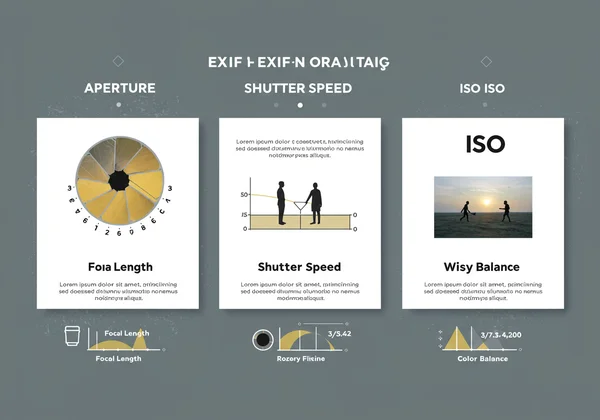
Ouverture (nombre f) : C'est sans doute le réglage le plus important en portrait. Il contrôle directement la profondeur de champ, déterminant à quel point votre arrière-plan est transformé en un flou crémeux et discret (bokeh) pour faire ressortir votre sujet.
-
Vitesse d'obturation : Ce réglage est crucial pour gérer la netteté. Une vitesse d'obturation rapide fige les mouvements subtils de votre sujet pour un portrait net et clair, tandis qu'une vitesse plus lente peut être utilisée pour un flou de mouvement intentionnel et créatif.
-
ISO : Sensibilité de votre appareil photo à la lumière. L'analyse de l'ISO vous aide à comprendre comment équilibrer l'exposition dans des conditions de faible luminosité tout en minimisant le bruit numérique qui peut dégrader la texture de la peau.
-
Longueur focale : Cela révèle la perspective de l'objectif utilisée. Cela vous aide à comprendre l'impact du choix de l'objectif sur les traits du visage, la compression et la relation entre votre sujet et l'arrière-plan.
-
Balance des blancs : Obtenir des tons de peau agréables et précis est primordial. Le réglage de la balance des blancs vous indique comment l'appareil photo a compensé la température de couleur de la lumière ambiante.
Comment analyser des photos de portrait à l'aide d'un outil en ligne
Maintenant que vous savez ce qu'il faut rechercher, vous avez besoin d'un outil pour accéder à ces informations. Bien que certains logiciels de bureau puissent lire les métadonnées, un lecteur EXIF en ligne offre une facilité inégalée. Ce visualiseur de métadonnées d'image est conçu pour les photographes qui apprécient à la fois l'efficacité et la sécurité, vous permettant de vérifier les données EXIF en quelques secondes.
Guide étape par étape pour visualiser les données EXIF en ligne
Le processus est incroyablement simple et, surtout, entièrement privé. Voici comment vous pouvez instantanément voir les données derrière n'importe quel portrait :
-
Visitez la page d'accueil : Ouvrez votre navigateur web et accédez à notre visualiseur EXIF gratuit.
-
Sélectionnez votre image : Faites glisser et déposez votre photo de portrait directement sur la page, ou cliquez sur la zone de téléchargement pour sélectionner un fichier depuis votre ordinateur.
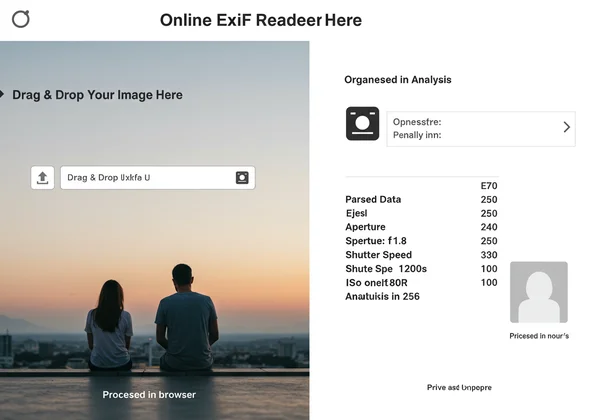
- Analyse instantanée : L'analyse s'effectue instantanément. Votre image est traitée directement dans votre navigateur. Votre photo ne quitte jamais votre appareil et n'est jamais téléchargée sur un serveur. Cela garantit une confidentialité absolue pour votre travail et vos sujets.
- Consultez le rapport : Un rapport propre et organisé apparaît, affichant toutes les balises EXIF clés. Vous pouvez faire défiler pour trouver l'ouverture, la vitesse d'obturation, l'ISO et d'autres réglages critiques que vous souhaitez analyser.
Apprendre des réglages d'appareil photo pour portraits, les vôtres et ceux des autres
La véritable puissance d'un lecteur de données EXIF réside dans son application. Vous pouvez l'utiliser comme un outil d'apprentissage dynamique pour accélérer votre progression.
- Auto-critique et croissance : Parcourez votre propre portfolio. Téléchargez vos portraits préférés et ceux qui n'ont pas tout à fait réussi. Comparez les données EXIF. Avez-vous utilisé une ouverture plus grande sur vos meilleurs clichés ? Votre vitesse d'obturation était-elle trop lente sur les photos floues ? Cette pratique permet de tirer de précieuses leçons des erreurs.
- Analyse inspirée : Avez-vous vu un portrait en ligne que vous admirez ? Si vous avez la permission ou si l'image est dans le domaine public, vous pouvez souvent apprendre des données EXIF laissées intactes par le photographe. Utilisez un visualiseur EXIF d'image pour étudier leurs choix techniques et comprendre les réglages derrière leur style signature.
Tirer parti des données EXIF pour améliorer vos compétences en portrait
Analyser les données n'est que la moitié du chemin. L'étape suivante consiste à appliquer ces informations à votre propre processus de prise de vue. En comprenant la relation de cause à effet entre les réglages et les résultats, vous pouvez prendre des décisions plus intentionnelles derrière l'appareil photo.
Maîtriser l'ouverture pour la profondeur de champ et le bokeh
Lorsque vous visualisez les données EXIF et que vous voyez une ouverture de f/1.8 ou f/2.8 sur un portrait époustouflant, vous avez un indicateur clair de la façon dont le photographe a obtenu ce magnifique flou d'arrière-plan. Utilisez ces connaissances pour expérimenter. Pour un sujet unique, essayez de photographier avec l'ouverture la plus large que votre objectif permet. Pour les portraits de groupe, vous remarquerez peut-être que les clichés réussis utilisent une ouverture plus étroite (comme f/4 ou f/5.6) pour garder tout le monde net. Utilisez un visualiseur EXIF pour confirmer ces schémas.
Optimiser la vitesse d'obturation et l'ISO pour la netteté et l'éclairage
Vos portraits sont-ils parfois légèrement flous ? Vérifiez les données EXIF sur vos images les plus nettes. Vous trouverez probablement une vitesse d'obturation d'au moins 1/125s ou plus rapide, surtout avec des prises de vue à main levée. Pour un moyen rapide et sécurisé de vérifier les données EXIF, notre outil en ligne est le choix idéal. Lorsque vous photographiez en basse lumière, analyser l'équilibre entre la vitesse d'obturation et l'ISO dans d'autres photos réussies peut être une révélation. Vous apprendrez les seuils de sensibilité ISO acceptables de votre appareil photo avant que le bruit ne devienne gênant, vous aidant à affiner vos réglages pour des images propres et nettes dans n'importe quel environnement.
Choix de la longueur focale et impact de l'objectif sur la perspective du portrait
Les données EXIF afficheront la longueur focale exacte utilisée, comme 50mm, 85mm ou 135mm. L'analyse de ces informations sur de nombreux portraits révèle pourquoi celles-ci sont considérées comme des focales classiques pour le portrait. Un objectif de 85mm, par exemple, offre une belle compression et une perspective flatteuse pour les visages. En utilisant un outil photo en ligne pour étudier les longueurs focales des images que vous aimez, vous pouvez prendre des décisions plus éclairées sur l'objectif à utiliser pour votre prochaine séance.
Débloquez votre potentiel en photographie de portrait grâce à l'analyse EXIF
Les données EXIF constituent une ressource inestimable et souvent négligée pour tout photographe de portrait. En analysant constamment ces détails cachés, vous acquérez une compréhension plus approfondie des choix techniques derrière des images captivantes. Cela vous permet d'affiner vos réglages d'appareil photo pour les portraits et de perfectionner véritablement vos clichés, passant de la conjecture à un art délibéré. Avec cet outil en ligne sécurisé, cette analyse puissante est gratuite, sécurisée et incroyablement facile.
Ne laissez pas passer de précieuses opportunités d'apprentissage. Cessez de vous interroger et commencez à savoir.
Prêt à transformer votre photographie de portrait ? Analysez les données de vos derniers clichés dès aujourd'hui !
Questions Fréquemment Posées sur les Données EXIF et la Photographie de Portrait
Comment trouver les meilleurs réglages d'appareil photo pour les portraits ?
La meilleure façon est d'analyser les données EXIF des photos de portrait réussies, y compris les vôtres et celles que vous admirez. Utilisez un lecteur de données EXIF pour étudier l'ouverture, la vitesse d'obturation, l'ISO et la longueur focale. Cela révèle des modèles et constitue un excellent point de départ pour que vous puissiez expérimenter et développer votre propre style.
Les données EXIF affichent-elles la localisation dans mes photos de portrait ?
Oui, c'est possible. Si votre appareil photo ou votre smartphone a le GPS activé, les données EXIF peuvent contenir les coordonnées GPS précises de l'endroit où la photo a été prise. Il est crucial de vérifier les données EXIF avec un lecteur EXIF en ligne avant de partager des portraits en ligne pour protéger votre propre vie privée et celle de vos clients ou sujets.
Quel est le meilleur visualiseur EXIF gratuit pour les photographes de portrait ?
Ce visualiseur EXIF gratuit est excellent car il est rapide, complet et met l'accent sur votre vie privée. Puisqu'il traite les images directement dans votre navigateur sans les télécharger, vos fichiers restent entièrement sécurisés sur votre ordinateur, ce qui en fait un choix fiable pour les photographes amateurs et professionnels qui souhaitent lire les données EXIF en toute sécurité.
Puis-je apprendre des données EXIF de photographes de portrait célèbres ?
Tout à fait. De nombreux photographes partagent des images en ligne avec les métadonnées toujours attachées. Si vous trouvez une image du domaine public ou si vous avez la permission d'analyser une photo, vous pouvez utiliser un visualiseur de métadonnées d'image pour étudier les techniques des maîtres photographes et obtenir des informations inestimables sur leur art.
Comment m'assurer que les données EXIF de mes photos de portrait ne sont pas supprimées lors du partage ?
La plupart des plateformes de médias sociaux (comme Instagram et Facebook) suppriment automatiquement la plupart des données EXIF, en particulier les informations GPS sensibles, lors de la mise en ligne pour protéger la vie privée des utilisateurs. Si vous souhaitez partager une photo avec ses métadonnées intactes, vous devrez généralement envoyer le fichier original directement ou l'héberger sur un site de portfolio photographique qui les préserve. Conservez toujours des sauvegardes de vos fichiers originaux.