GPS EXIF 데이터 안내: 사진 위치 정보 확인 및 개인 정보 보호
사진 한 장 한 장에는 이야기가 담겨 있습니다. But beyond the pixels, your images might be sharing a secret you didn't intend to reveal: your exact location. This hidden information, called GPS EXIF data, is automatically embedded in many digital photos. 온라인에 공유하는 사진이 어떤 위치 정보를 담고 있는지 알고 계신가요?
Understanding this data is crucial. For photographers, it can be a powerful tool for organizing and cataloging their work. For everyone else, it can be a serious privacy risk. This guide will teach you what GPS EXIF data is, why it matters, and how you can view it safely and instantly. With the right knowledge, you can take control of your digital footprint.

We believe that checking your photo's data should be simple and completely private. That's why we created a free tool that works entirely in your browser, never uploading your files to a server. You can 사진 데이터를 확인하세요 securely in seconds and see for yourself what information they hold.
GPS EXIF 데이터란 무엇이며 사진에 어떤 영향을 미칠까요
EXIF 데이터는 모든 사진 파일에 첨부된 디지털 정보 표식과 같습니다. This label contains a wealth of information. It includes camera settings like aperture and shutter speed, plus the date and time a picture was taken. When your camera or smartphone has its location services enabled, it adds GPS coordinates to this label, a process known as geotagging.
This geotagged information can be incredibly useful, but it also carries significant implications for your privacy. Understanding what it contains is the first step toward managing it effectively.
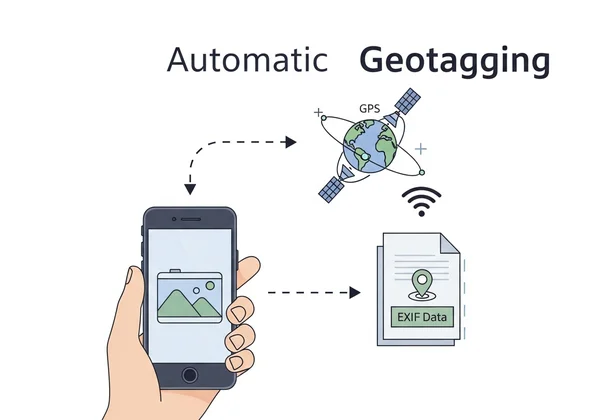
지오태깅이란: 카메라가 위치 정보를 기록하는 방법
사진을 한 장 찍으면 GPS가 활성화된 전화기나 카메라에서 기기가 귀하의 좌표를 가져옵니다. It embeds them in the file with camera specs.
This happens automatically in the background. The result is a photo that doesn't just capture a moment but also pinpoints the exact spot on Earth where that moment occurred. This feature is often on by default, meaning many users are creating a detailed map of their lives without even realizing it.
태그 확인: 찾을 수 있는 주요 GPS EXIF 정보
When you use a tool to view this data, you'll see several specific GPS tags. While they might look technical, they are easy to understand. The most common pieces of information you can find include:
- GPS 위도와 경도: These are the core coordinates that define the exact location. They can pinpoint a spot with remarkable accuracy, often down to a few meters.
- GPS 해발 고도: This tag tells you the height above sea level where the photo was taken. It's particularly interesting for photos taken in mountainous regions or from high-rise buildings.
- GPS 타임스탬프: This records the Coordinated Universal Time (UTC) when the location was logged. It provides an official timestamp separate from the local time stored in other EXIF data.
- GPS 방향: Some advanced devices can also record the direction the camera was facing, giving even more context to the shot.
GPS EXIF 데이터의 장단점: 창의적인 활용과 개인 정보 보호
GPS EXIF data is neither inherently good nor bad; its impact depends on how it's used. For photographers and travelers, it's a fantastic organizational tool. You can sort thousands of photos by location, create interactive travel maps, or recall the precise spot where you captured a perfect sunset.
However, the same data can become a serious liability. A home geotag shares your address. Vacation pics signal an empty house to thieves. For journalists or activists, it could be life-threatening. The key is to be aware of this data so you can decide when to use it and when to protect it.
저희 Exif 리더 도구로 사진의 GPS 위치를 온라인에서 확인하기
Now that you understand what GPS EXIF data is, the next question is: how can you see it for your own photos? You need a reliable and safe photo GPS coordinates viewer. While some desktop software can do this, an online tool is often faster and more convenient. However, many online services require you to upload your photos to their servers, creating a new privacy risk.
This is where our Exif reader tool is different. Our entire process happens locally in your web browser. Your photos never leave your computer, guaranteeing your privacy is 100% protected. It's the most secure way to check your photo's location online.
안전한 방법: 브라우저 기반 도구로 GPS 데이터 확인하기 (스크린샷 포함)
We designed our tool to be incredibly simple. You don't need to install anything or sign up for an account. Here's how you can see your photo's GPS data in just a few seconds:
- 저희 홈페이지를 방문하세요: Open your web browser and go to our secure EXIF viewer.
- 이미지를 끌어와 지정된 영역에 놓으세요: Simply drag an image file from your computer and drop it onto the designated area on the website. Alternatively, you can click the box to browse and select a file.
- 데이터 즉시 보기: The tool will immediately analyze the file right there in your browser. A structured report will appear, showing all the EXIF data, including a dedicated GPS section if location information is present.
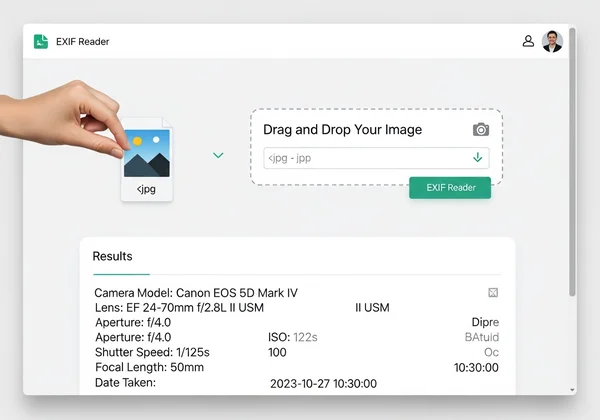
Because nothing is uploaded, the process is instant and completely secure. You can check as many photos as you want, free of charge. It's the perfect way to quickly try our free tool and gain peace of mind.
GPS 데이터 활용: 좌표를 지도에서 확인하는 방법
Once our tool reveals the GPS latitude and longitude coordinates, you can easily turn that raw data into a visual location. It's as simple as copying the coordinates from the results page.
Next, open an online mapping service like Google Maps or OpenStreetMap. Paste the coordinates into the search bar and press Enter. The map will instantly zoom in on the exact location where your photo was taken. This powerful feature helps you visualize your data and fully understand the story your image is telling.
개인 정보 보호: GPS 메타데이터 관리로 디지털 발자국 줄이기
Awareness is the first step, but action is what truly protects you. Now that you know how to check for GPS data, you can take steps to manage your digital footprints and prevent accidental privacy leaks. Protecting your location information is essential in today's digital world.
숨겨진 위험성: 위치 데이터를 공유할 때 주의해야 하는 이유
Sharing photos with embedded location data may seem harmless, but the risks are real. If you post a photo of a new purchase taken inside your home, you've just shared your address alongside an inventory of your valuables. If you consistently post geotagged photos from your favorite cafe or park, you are creating a map of your daily routine for anyone to see.
This information can be exploited by stalkers, burglars, or malicious individuals. In less extreme cases, it can simply lead to an uncomfortable loss of privacy. Before you share any photo, it's wise to check for location data and make an informed decision.

공유 전 확인 사항: 위치 정보 노출 방지
Protecting your privacy doesn't mean you have to stop sharing photos. It just means you need to be mindful. Follow these best practices to keep your location secure:
- 기기에서 지오태깅 비활성화: The most effective method is to prevent the data from being recorded in the first place. Go into your smartphone's camera settings and turn off location tagging.
- 공유 전 확인: Make it a habit to run any photo through a secure viewer like ours before posting it online, especially if it was taken in a sensitive location.
- 플랫폼 정책 이해: Big sites like Instagram often strip EXIF. But it's not guaranteed. Smaller apps might keep it. Check and remove yourself first.
GPS 데이터 삭제 방법: 서드파티 도구 및 소프트웨어 활용
This free viewer is a powerful and secure viewer—it allows you to see the data without any risk. It is important to note that our tool does not edit or remove this metadata.
If you find a photo with GPS data that you want to remove before sharing, you have several options. Most modern operating systems offer built-in ways to do this. For example, Windows offers a built-in way to do this. Right-click a photo file, go to "Properties," then "Details." Look for the option to "Remove Properties and Personal Information." On macOS, the Photos app has tools for managing location data. For more advanced needs, dedicated third-party "EXIF editor" or "metadata stripper" applications are also available.
사진의 숨겨진 위치를 직접 관리하세요
Your photos capture moments, but their GPS data can map your life. Use it to organize shots or strip it to stay safe – the choice is yours.
Ready to see what secrets your images hold? The safest and easiest way to start is by using a tool that puts your privacy first. 사진 속 숨겨진 정보 확인 today and take charge of your digital footprint.
사진 GPS 데이터에 대한 자주 묻는 질문
EXIF 데이터가 항상 위치를 표시하고, 이를 끌 수 있나요?
No, EXIF data only includes a location if the camera or smartphone's location services were enabled when the photo was taken. You can easily turn this feature off. On an iPhone, go to Settings > Privacy & Security > Location Services > Camera, and select "Never." On Android, open your Camera app settings and look for an option like "Location tags" or "Save location" and disable it.
사진의 정확한 원본 GPS 메타데이터를 어떻게 확인할 수 있나요?
Want unaltered GPS info? Grab a local viewer like ours – no uploads, no risks. Just drag, drop, and 원본 GPS 메타데이터 보기.
페이스북이나 인스타그램 같은 소셜 미디어 플랫폼이 GPS EXIF 데이터를 자동으로 제거하나요?
Generally, yes. Most major social media platforms, including Instagram, Facebook, and X (formerly Twitter), automatically strip EXIF data from uploaded images. They do this to protect their users' privacy. However, you should not rely on this entirely. Policies can change, and it's always the safest practice to check and remove sensitive data yourself before uploading.
스크린샷에 GPS EXIF 데이터가 포함될까요?
Typically, no. A screenshot is a capture of what is currently displayed on your screen, not a photograph taken by the camera's sensor. As such, screenshots usually do not contain any GPS EXIF data. The metadata they do have is often very minimal, such as the date, time, and device model, but not the geographic location.